Aktuelle Version: 1.0.4
Installation & Support
Laden Sie die Setup-Datei herunter und starten Sie diese per Doppelklick. Folgen Sie anschließend den Anweisungen des Installationsassistenten. Für die Installation werden Administratorrechte benötigt.
GameCam benötigt keine Online-Aktivierung und kann nach der Installation vollständig offline verwendet werden.
Bei Problemen prüfen Sie bitte zunächst, ob Windows und der Grafikkartentreiber aktuell sind. Unter Windows-N-Versionen muss gegebenenfalls das Media Feature Pack installiert werden.
Support:
support@scriptworldx.de
Herausgeber:
ScriptWorldX IT
Michael Schiefer
GameCam benötigt keine Online-Aktivierung und kann nach der Installation vollständig offline verwendet werden.
Bei Problemen prüfen Sie bitte zunächst, ob Windows und der Grafikkartentreiber aktuell sind. Unter Windows-N-Versionen muss gegebenenfalls das Media Feature Pack installiert werden.
Support:
support@scriptworldx.de
Herausgeber:
ScriptWorldX IT
Michael Schiefer
Hauptsoftware
GameCam
Professionelle Bildschirm- und Gameplay-Aufnahme
Bildschirm- und Gameplay-Recorder mit bis zu 4K, 120 FPS, 160 Mbit/s sowie System- und Mikrofonton.
GameCam ist eine moderne Aufnahmesoftware für Windows, mit der sich Desktop-Inhalte, Anwendungen, Videos und Gameplay in hoher Qualität aufzeichnen lassen.
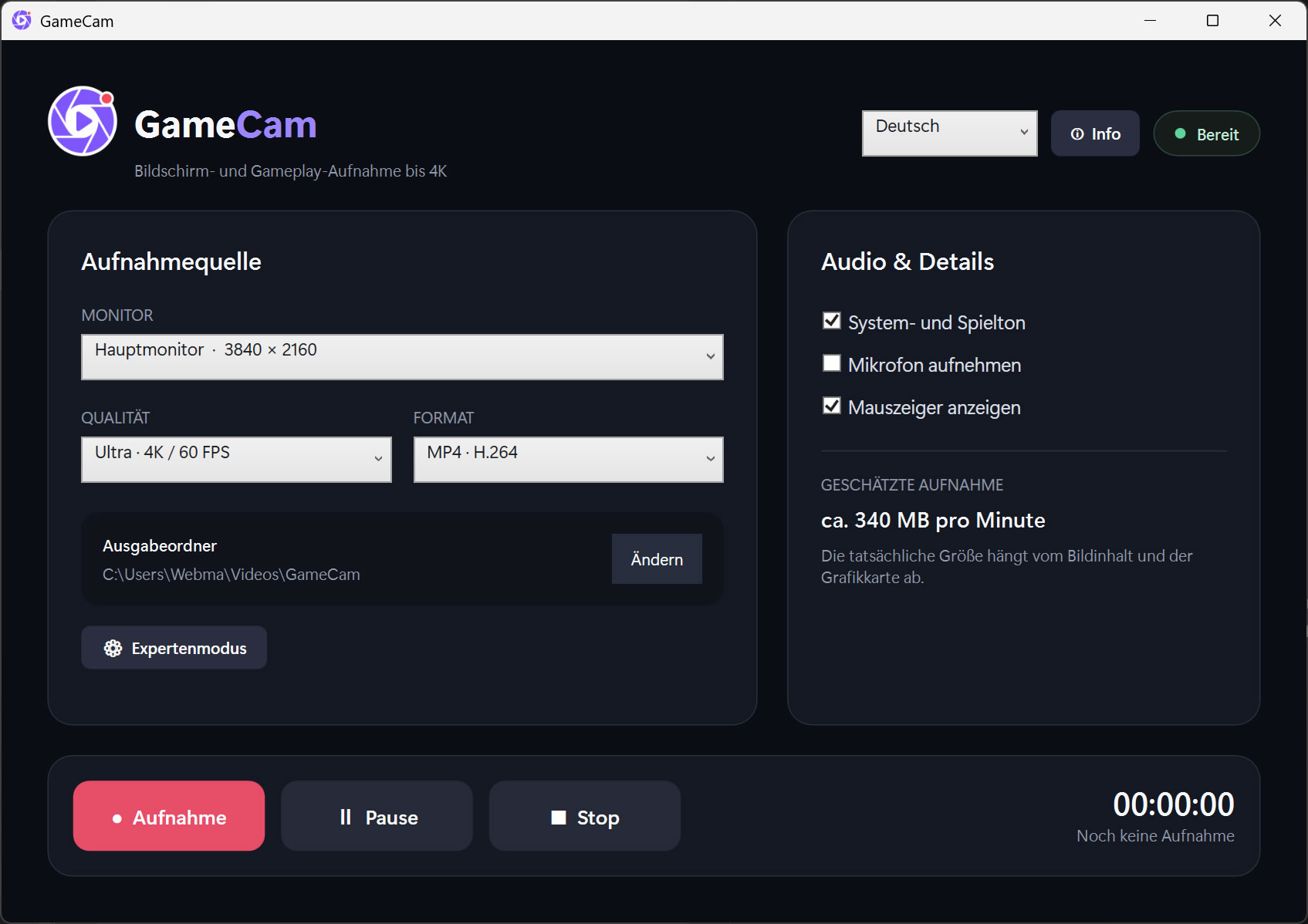
Die Anwendung unterstützt Aufnahmen mit bis zu 4K-Auflösung, 120 Bildern pro Sekunde und einer individuell einstellbaren Bitrate von bis zu 160 Mbit/s. System- beziehungsweise Spielton und Mikrofon können gemeinsam oder getrennt aufgenommen werden.
Funktionen:
• Aufnahme eines frei wählbaren Monitors
• Bildschirm- und Gameplay-Aufnahme bis 4K
• Bildraten mit 30, 60 oder 120 FPS
• Einstellbare Bitrate bis 160 Mbit/s
• Hardwarebeschleunigte H.264-Kodierung
• Aufnahme von System- und Spielton
• Optionale Mikrofonaufnahme
• Einblendbarer Mauszeiger
• Aufnahme, Pause, Fortsetzen und Stop
• Frei wählbarer Ausgabeordner
• MP4-Ausgabe
• Expertenmodus für Auflösung, Bildrate und Bitrate
• Integrierte Prüfung der Monitorfrequenz und Encoderlast
• Mehrsprachige Benutzeroberfläche
• Modernes und übersichtliches WPF-Design
GameCam arbeitet vollständig lokal. Aufnahmen werden nicht automatisch hochgeladen oder an externe Dienste übertragen.
Die Anwendung unterstützt Aufnahmen mit bis zu 4K-Auflösung, 120 Bildern pro Sekunde und einer individuell einstellbaren Bitrate von bis zu 160 Mbit/s. System- beziehungsweise Spielton und Mikrofon können gemeinsam oder getrennt aufgenommen werden.
Funktionen:
• Aufnahme eines frei wählbaren Monitors
• Bildschirm- und Gameplay-Aufnahme bis 4K
• Bildraten mit 30, 60 oder 120 FPS
• Einstellbare Bitrate bis 160 Mbit/s
• Hardwarebeschleunigte H.264-Kodierung
• Aufnahme von System- und Spielton
• Optionale Mikrofonaufnahme
• Einblendbarer Mauszeiger
• Aufnahme, Pause, Fortsetzen und Stop
• Frei wählbarer Ausgabeordner
• MP4-Ausgabe
• Expertenmodus für Auflösung, Bildrate und Bitrate
• Integrierte Prüfung der Monitorfrequenz und Encoderlast
• Mehrsprachige Benutzeroberfläche
• Modernes und übersichtliches WPF-Design
GameCam arbeitet vollständig lokal. Aufnahmen werden nicht automatisch hochgeladen oder an externe Dienste übertragen.
Lizenzvariante wählen
Systemvoraussetzungen
• Windows 10 oder Windows 11, 64-Bit
• x64-Prozessor
• Mindestens 4 GB Arbeitsspeicher, 8 GB oder mehr empfohlen
• DirectX-11-kompatible Grafikkarte
• Microsoft Media Foundation
• Visual C++ 2015–2022 Redistributable (x64)
• Ausreichend freier Speicherplatz für Videoaufnahmen
Für 4K-, 60-FPS- oder 120-FPS-Aufnahmen wird eine leistungsfähige Grafikkarte mit Hardware-H.264-Encoder empfohlen. Die tatsächlich erreichbare Aufnahmeleistung hängt von Monitorfrequenz, Grafikkarte, Spiel, Auflösung und Systemeinstellungen ab.
• x64-Prozessor
• Mindestens 4 GB Arbeitsspeicher, 8 GB oder mehr empfohlen
• DirectX-11-kompatible Grafikkarte
• Microsoft Media Foundation
• Visual C++ 2015–2022 Redistributable (x64)
• Ausreichend freier Speicherplatz für Videoaufnahmen
Für 4K-, 60-FPS- oder 120-FPS-Aufnahmen wird eine leistungsfähige Grafikkarte mit Hardware-H.264-Encoder empfohlen. Die tatsächlich erreichbare Aufnahmeleistung hängt von Monitorfrequenz, Grafikkarte, Spiel, Auflösung und Systemeinstellungen ab.